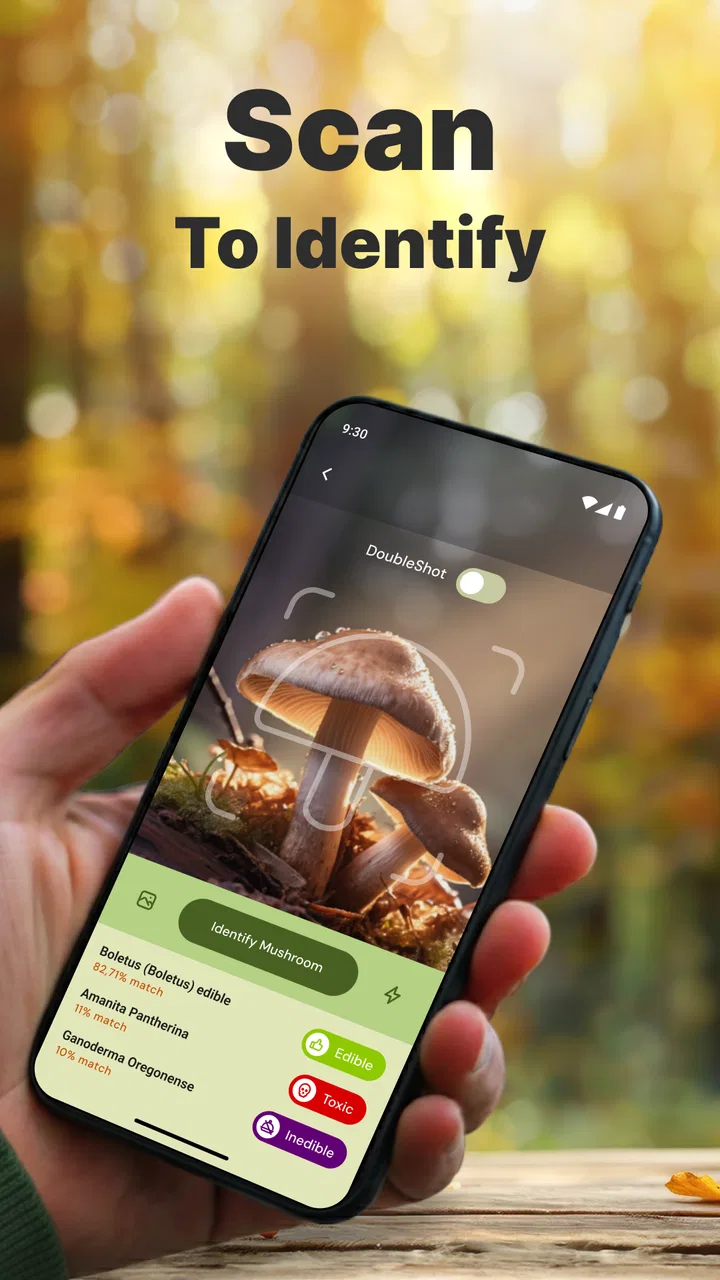
Mushroom Identification
- 4.1
- Rating
- 1.00M
- Installs
- Free
- Price

 Analysis by App-foxy
Mushroom Identification is the kind of app I would keep in mind for a walk, a garden check, or a curious moment outdoors when I find a mushroom I cannot name. Its purpose is straightforward: it uses AI to help identify mushrooms from an image. That sounds simple, but the useful question is not only whether it can produce a name. It is whether the whole process is clear enough when the photo is imperfect, the mushroom is partly hidden, or the result needs a little interpretation.
After spending time with it, my impression is that this is best treated as a fast identification aid rather than a final authority. It can help narrow down what you are looking at, especially when you have no idea where to begin. At the same time, mushroom identification is a field where visual similarity matters, so I would never use an app result alone to decide whether something is safe to eat. That distinction is central to getting value from this House & Home app.
Where the experience usually gets stuck
The first point of friction is often the photograph, not the recognition system. A mushroom can look obvious to the eye while appearing very different in a small, dark, blurry image. A cap covered with leaves, a stem hidden in grass, harsh sunlight, or a wet surface can remove the details an AI tool needs. If the result feels uncertain or unexpected, I would first question the image before assuming the app has failed.
You May Also Like

 Pandora - Music & Podcasts
Pandora’s Music Is Easy to Start, but Harder to Recover
Pandora’s strength is its low-effort path from a seed to a station. Its weak spot is how much confidence it asks you to place in connection, setup, and quiet recovery.

 AccuWeather: Weather Radar
AccuWeather Review: A Quick, Clear Forecast for Everyday Decisions
For everyday plans, the best forecast is the one you can understand quickly. AccuWeather makes rain timing, radar, and local conditions easy to act on, with a few trade-offs.

 Hill Climb Racing
Why Hill Climb Racing Still Turns Crashes Into One More Run
A tiny car, a bumpy hill and one more upgrade: Hill Climb Racing keeps resurfacing because its simple chaos makes every near-miss feel personal.

 AliExpress - Shopping App
AliExpress Makes Global Shopping Feel Personal, but Shoppers Bear the Risk
AliExpress turns a global marketplace into a pocket-sized discovery engine. Its reach is useful, its shopping loop compelling, and its trade-offs easy to miss.

 Lords Mobile: Kingdom Wars
Lords Mobile Is a Kingdom-Building Routine, Not a Quick Match
A case-by-case verdict on the building, battles, device demands, and social commitments that make Lords Mobile rewarding for some players and exhausting for others.

 PDF Scanner app - TapScanner
TapScanner Makes Paperwork Easier to Capture, Check, and Share
TapScanner makes scanning with a phone feel less like a rescue operation and more like a dependable step in getting work done. Its capture tools are useful, though not flawless.
More From Our News Desk
View All News


I found it helpful to think of the camera screen as the beginning of the identification process. A single quick snapshot may be enough for a distinctive specimen, but it gives the app less to work with when several species share similar colors and shapes. A closer image of the cap, another showing the side profile, and a third showing the stem can create a much more useful record. The app may still return one result, but I can judge that result more sensibly when the photos show the mushroom clearly.
Another common sticking point is expecting a name to be an instant fact. AI identification normally works by comparing visible patterns, so it is more convincing when the subject is centered and unobstructed. A mushroom photographed from far away may be recognized as something broadly similar without giving a dependable species-level answer. I would avoid taking a result as definitive simply because it appears quickly or sounds familiar.
The app’s short store description presents it as “Mushroom ID,” while its longer summary focuses on instant AI-powered identification. In practice, that makes it appealing to beginners who want a starting point, but it also sets up a possible misunderstanding. “Instant” describes the speed of getting a response, not a guarantee that every response will be correct under every condition.
There is also a practical issue with unusual specimens. If the mushroom is young, damaged, dried out, unusually colored, or photographed after its cap has opened, the visual clues may not match the examples the system expects. I would record the result, take better photographs, and compare the appearance with a trusted field guide before drawing conclusions. That extra step is especially important when the identification could influence food, pets, children, or contact with bare skin.
What to check before taking the first picture
Before opening the camera workflow, I would decide what I actually need from the app. If I am simply curious about a mushroom in a park, a broad suggestion may be enough. If I am documenting fungi in my yard, I want clear images that I can revisit later. If I am considering eating a wild mushroom, this app should not be the deciding tool. The right expectation prevents a lot of frustration.
Lighting makes a noticeable difference. Soft daylight is usually easier to work with than a strong flash or deep shade. I try not to place my phone so close that the lens casts a shadow over the subject. I also avoid cropping away the surroundings too aggressively, because the ground, leaf litter, and growth pattern can help me understand whether the result makes sense, even if the app mainly relies on the mushroom itself.
Focus is worth checking before submitting an image. On a phone, tapping the mushroom on screen can help keep the cap or stem sharp. I would take a moment to look at the preview rather than assuming the camera captured what my eyes saw. If the cap is sharp but the stem is hidden, I take another image from a lower angle. That small habit is more useful than repeatedly sending the same blurry photograph.
For a particularly interesting specimen, I use a simple three-view routine:
- Top view: I show the cap shape, color, texture, and any markings.
- Side view: I include the cap edge, stem, and overall proportions.
- Context view: I show where it is growing, without letting the mushroom become too small to inspect.
This routine is one of the most practical improvements I can make because it separates a genuine identification problem from a poor input problem. It also gives me material to compare with a book or an experienced identifier later. I would not handle an unknown mushroom unnecessarily just to photograph it; a careful image from where it grows is usually the safer approach.
On the software side, Mushroom Identification is free to install, although it includes in-app purchases ranging from $0.99 to $99.99 per item. That range is important to notice before committing to any paid option. I would begin with the basic experience and only consider an in-app purchase if I understand exactly what it changes for my use. A free download does not automatically mean every part of the experience is free.
The app is rated for Everyone 10+, which feels sensible for a nature-identification tool, but younger users should still have an adult involved when the subject is an unknown mushroom. The age label is not a safety certificate for the mushroom itself. I would explain to a child that the app can suggest an identity, while a responsible adult must decide what happens next.
Setup checks that save time later
Mushroom Identification comes from the developer Battery Stats Saver and runs on Android devices using version 8.0 or later. Before planning to use it on an older phone, I would check the operating system first. If installation is unavailable, the problem may simply be compatibility rather than the camera or the identification process.
I would also make sure the phone has enough practical room for the app and for the pictures I want to keep. I do not need a special camera setup, but a lens covered with fingerprints can make a good scene look hazy. Cleaning the lens, closing other camera-heavy apps, and reopening the identification app are basic steps, yet they often matter more than changing settings at random.
When I first use an image-based tool, I prefer to test it with a mushroom that is easy to see rather than starting with a difficult specimen hidden under plants. This gives me a baseline for how the workflow behaves on my phone. If the first attempt is confusing, I can separate a setup issue from the natural uncertainty of identifying a challenging mushroom.
The app’s current version is 4.0.8, so I would keep it updated through the normal app store process when an update is available. Updates can affect stability and compatibility, but I would not assume that updating will turn an ambiguous photograph into a certain identification. Software maintenance and photographic quality solve different problems.
A stable connection can also be useful for an AI-based workflow, particularly if the recognition step depends on processing beyond the phone. I would try the app in a place where the phone can communicate normally before deciding it is unreliable in the field. For a walk in an area with weak reception, I would take photographs first and plan to review them when I am back in a better-connected location, rather than repeatedly tapping the same action.
One setup habit I recommend is keeping the original image. If the app produces a surprising result, the unedited photograph lets me inspect what it actually saw. Heavy filters, extreme cropping, and automatic enhancements may make a picture look attractive but can also change the visual clues. I prefer a natural image for identification and a separate edited copy for sharing.
Recovering when the workflow goes wrong
When an identification attempt fails, I would work through the process in a fixed order. First, I check whether the image is sharp and whether the mushroom occupies enough of the frame. Next, I try a different angle. Then I reopen the app and submit a fresh image rather than relying on the same file repeatedly. This approach is simple, but it prevents me from confusing a bad photograph, a temporary app problem, and a genuinely difficult specimen.
If the result changes dramatically between two clear photographs, I treat that inconsistency as a warning to slow down. It may mean the mushroom has features that resemble several possibilities, or that one view is hiding an important detail. I would not choose the result I like best. Instead, I would compare the suggested identities with a reliable reference and look for features that distinguish them, such as the relationship between cap and stem or the way the mushroom grows.
If the camera does not open correctly, I would close the app completely and try again. I would also check whether the phone’s camera works normally in its ordinary camera application. If the standard camera is failing too, the issue is probably with the device or its system rather than this particular app. If the normal camera works but the identification workflow does not, restarting the app and checking for an available update are reasonable next steps.
If a picture cannot be submitted, I would try a smaller, ordinary photo taken directly with the phone instead of a heavily edited file. I would also avoid sending a batch of nearly identical images before confirming that the first one has finished processing. Repeated taps can make a slow response feel like a broken workflow, while waiting briefly and then checking the result is usually cleaner.
There is a useful recovery method for field trips: photograph first, identify later. I can take several clear views without standing in the same spot trying to force an immediate answer. Back at home, I can review the images in better light, submit the strongest one, and use the others to question the result. This is more reliable than treating a weak signal or rushed framing as part of the identification itself.
For personal records, I would write down the location and date beside the image in my notes rather than expecting the identification app to serve as a complete field journal. That information helps me notice whether similar mushrooms return to the same area. It also gives a future expert more context if I need a second opinion. The app is most useful as one stage in a workflow, not as the entire archive.
One trade-off is convenience versus scrutiny. The faster the app gives me a candidate, the easier it is to move on without checking the visual details. I get better value when I use the quick result as a prompt: “What features support this?” and “What similar mushrooms should I rule out?” That mindset turns a one-tap answer into a small learning exercise.
When the app is not the cause
Some disappointing results are caused by the subject itself. Mushrooms can be damaged by weather, insects, animals, or age. A missing cap edge or broken stem may remove the very feature that separates one lookalike from another. In those cases, no camera angle can restore information that is no longer present. I would document what remains and accept that the safest conclusion may be a broad identification rather than a precise one.
The surroundings can also mislead the person taking the picture. A pale mushroom under green leaves may pick up a color cast, while direct sunlight can wash out markings. Wet caps can reflect the sky and make texture difficult to see. I would try a second image in softer light, but I would still remember that the original appearance may have changed since the mushroom first emerged.
Phone hardware is another factor. A device with a weak close-focus camera may struggle even when the app is functioning normally. I would move back slightly, use the phone’s normal focus behavior, and avoid digital zoom. A sharp image taken from a little farther away is more useful than a close image full of blur.
The biggest limitation is not technical. It is the danger of treating recognition as edibility advice. I would never eat a mushroom because an app produced a confident-looking name. Even a correct species suggestion may not account for regional lookalikes, individual sensitivity, preparation requirements, or the possibility that the photograph was misread. For food decisions, I would use an experienced local expert and established safety guidance instead.
The same caution applies around pets and children. If a dog has eaten an unknown mushroom, identifying it through an app should not delay contacting a veterinarian. If a child has touched or swallowed one, I would seek appropriate medical guidance rather than waiting for an image result. Mushroom Identification can support documentation, but it is not an emergency service.
Compared with a traditional field guide, the app is quicker when I have no idea where to start and do not know which visual category to browse. A book is slower at the beginning but often better for learning the differences between similar species and understanding the limits of an identification. Compared with asking a knowledgeable person, the app is more private and immediate, but an experienced identifier can ask follow-up questions that a single image cannot answer. I see the strongest approach as combining them: use the app to narrow the search, then verify independently.
Who will get the most from it
I think this app suits casual nature observers, homeowners who notice unfamiliar fungi in a yard, and beginners building an interest in mushroom photography. It is also useful for someone who wants a quick candidate name before opening a field guide. The free entry point makes it easy to try, while the install base of over 500 thousand suggests it has reached a substantial audience without requiring a specialist setup.
It is less suitable for a person who wants a guaranteed species determination from one low-quality photograph. It is also the wrong primary tool for foragers making eating decisions, researchers needing a carefully documented identification, or anyone who expects a full educational guide with extensive descriptions and comparison material. Those users will probably be better served by expert review, specialist references, or both.
The average rating is 3.9 from around 3.4 thousand ratings, with 29 written reviews shown alongside it. I read that as a reason to keep expectations measured rather than as a simple yes-or-no verdict. An app can be useful for quick visual exploration and still frustrate people whose photographs are difficult or whose expectations are higher than image recognition can support.
My favorite everyday scenario is a walk after rain. I notice a cluster near a tree, take a top view without disturbing it, capture the side profile, and save the location in my notes. I use the app to get a starting point, then compare the suggestion with a trusted reference at home. If the images disagree, I keep the mushroom unidentified. That workflow gives me the convenience I wanted without pretending that convenience removes uncertainty.
There is a small learning benefit here too. After using the app on several different specimens, I start paying more attention to cap texture, stem shape, and how the mushroom sits in its environment. The app does not replace learning those details, but it can encourage me to look for them. The best results come when I stay curious instead of chasing a particular answer.
For anyone considering paid features, my advice is to judge them against frequency of use. A person who only encounters a mushroom occasionally may find the free experience sufficient for casual curiosity. Someone documenting fungi regularly may value additional convenience, but should still confirm what an in-app purchase provides before spending. The available purchase range is broad enough that I would avoid tapping through casually.
My practical verdict after using it
Mushroom Identification is a handy first step for recognizing mushrooms from photographs, especially when I want a quick direction rather than a long search through a book. Its real strength is accessibility: I can begin with a phone image and turn an unfamiliar specimen into a more focused question. That is valuable for beginners and casual outdoor use.
Its limits are equally important. Results depend heavily on the photograph and on how distinctive the mushroom is. A fast answer can be mistaken for a certain answer, and that is where careless use becomes risky. I would take multiple views, preserve the original images, retry calmly when the workflow stalls, and verify any important result elsewhere.
The app is free to start, supports Android 8.0 and later, carries an Everyone 10+ rating, and is maintained by Battery Stats Saver. Those details make it approachable for many Android users, while the in-app purchase range means I would review any paid choice carefully. I would also keep the app updated, but I would not expect an update to solve problems caused by poor light, hidden features, or an inherently ambiguous specimen.
My recommendation is to use it as a visual assistant, not as the final word. If you enjoy identifying things you find outdoors, it can save time and give you a useful starting point. If your goal is safe foraging, professional documentation, or certainty about a poisonous lookalike, choose a qualified human source and specialist references instead. Used with that boundary in mind, Mushroom Identification is a practical companion for curiosity, photography, and everyday nature walks.
FAQs for Mushroom Identification
01What features does the Mushroom Identification app offer?
The Mushroom Identification app provides users with tools to identify various species of mushrooms using AI technology. It includes a vast database, detailed descriptions, high-resolution images, and a user-friendly interface. Additionally, the app offers offline access, making it convenient for outdoor enthusiasts to use without a data connection.
02How accurate is the AI technology in identifying mushrooms?
The AI technology in the Mushroom Identification app is highly accurate, drawing from an expansive database with thousands of mushroom species. While it provides reliable identifications, users are advised to cross-reference with expert sources or guides for critical identifications, especially for edible versus toxic mushrooms.
03Is the Mushroom Identification app available offline?
Yes, the app offers offline functionality, allowing users to access the database and identification tools without an internet connection. This is particularly useful for users exploring remote areas or locations with limited connectivity, ensuring they can still identify mushrooms in the field.
04Does the app provide information on the edibility of mushrooms?
The app includes detailed descriptions of each mushroom species, including edibility information. However, users are cautioned to exercise extreme care and consult additional expert resources before consuming any wild mushrooms, as misidentification can lead to severe health risks.
05Is the Mushroom Identification app free to use?
The app offers a free version with basic features, while a premium version is available for users seeking advanced functionalities. The premium version includes additional resources, ad-free experience, and more frequent database updates, catering to both casual users and serious mycologists.
Pros
- User-friendly interface for quick navigation.
- Accurate identification with detailed descriptions.
- Offline mode for field use without signal.
- Includes a large database of mushroom species.
- Frequent updates with new features and data.
Cons
- Limited to common species in some regions.
- Premium features require a subscription.
- Ads can be intrusive in free version.
- Occasional misidentification reported by users.
- Requires device camera access for identification.

Mushroom Identification
Gallery